
The clinical front door, in one queue
Referrals, results, discharge summaries and specialist letters arrive on four different channels and end up in four different places. MedOS gives them one destination, one triage workflow and one audit trail.
Every referral and result arrives in one place
Medical Objects, e-fax, email and the scanner all land in the same triage queue — classified, matched to a patient, assigned, actioned and audited. The clinical front door, finally in one piece.
Referral — chest pain, urgent
Dr Priya Raman · Northside GP
Medical ObjectsReferralPatient linkedFBC, UEC, LFT results
Melbourne Pathology
Medical ObjectsPathology resultPatient linkedScanned request form (2 pages)
+61 3 9xxx xxxx
E-faxReferralNeeds patient matchDischarge summary — 14 Aug
St Vincent's Hospital
E-faxDischarge summaryPatient linkedConsent form returned
reception@clinic.com.au
EmailConsent formPatient linked
Channels in
Medical Objects
Australian secure clinical messaging — referrals, specialist letters and results delivered straight into triage, with the raw message kept intact.
E-fax
The referral channel nobody has managed to switch off yet. Connect your fax provider and inbound faxes arrive as classified documents, not paper.
Monitored clinical mailboxes, with attachments split out and typed on arrival.
Scan & upload
Front-desk scanning and drag-and-drop for whatever walks in the door, filed the same way as everything else.
API
Push documents in from any system you already run, through the same envelope every other channel uses.
Matched, not guessed
MedOS proposes the patient from the message demographics. A confident match links itself; anything else waits in Needs patient match for a human. You can create the patient from the document in one step.
Linked to real work
Attach the document to a procedure, raise the booking, assign it to a person or a team, tag it, escalate it or file it — from the same screen you read it in.
Nothing lost, everything logged
The raw HL7 or original file is preserved untouched alongside the extracted data, and every action on a message is written to an audit trail.
Classified on arrival
If a person is retyping it, MedOS can do it
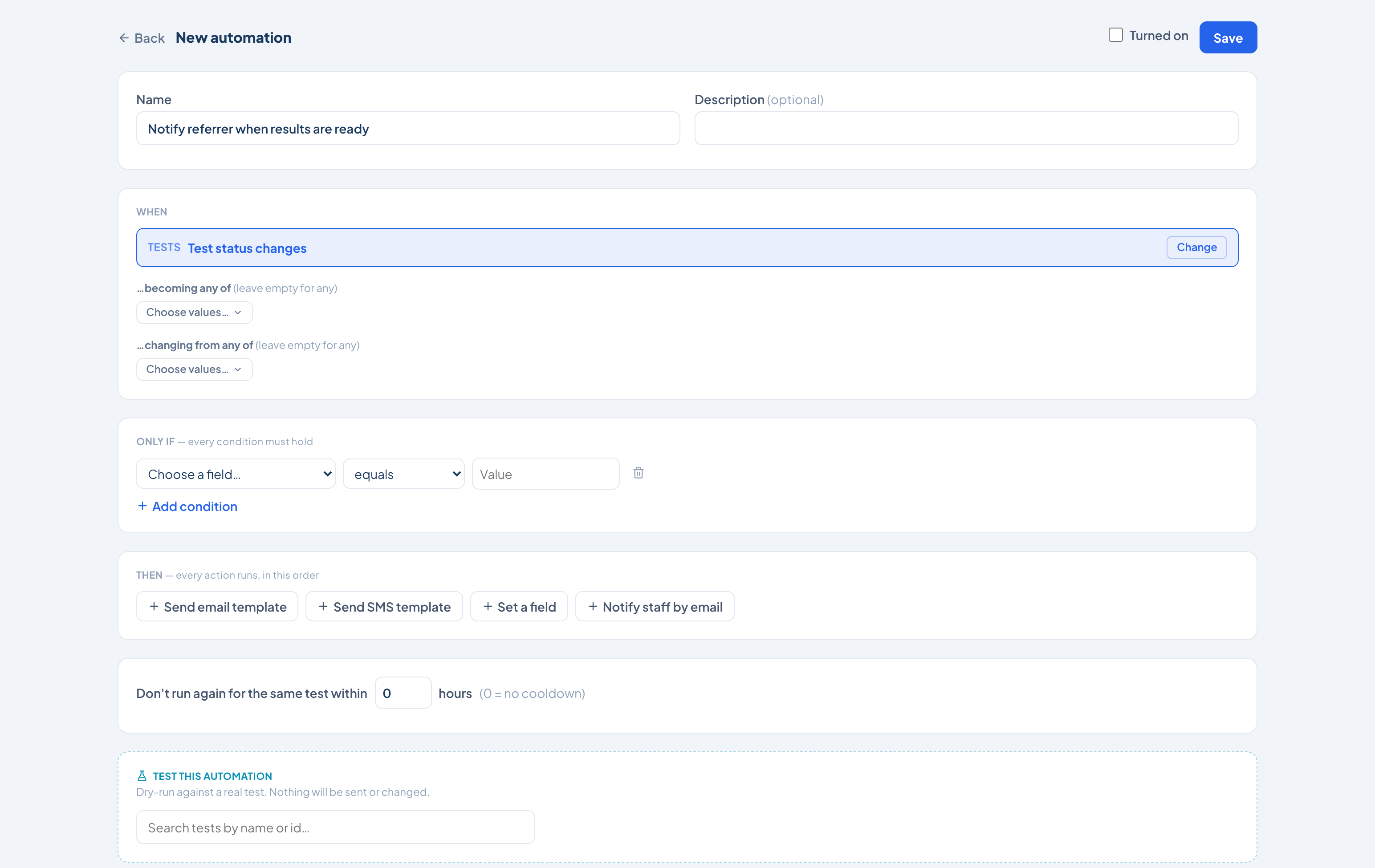
67 events across 17 parts of the platform can start a workflow. Write the rule the way you would explain it to a new starter — when this happens, and these things are true, do this — then dry-run it before you turn it on.
Workflows practices actually run
When
Test status changes
- …becoming any of
- Awaiting feedback
- …changing from any of
- In progress
Only if — every condition must hold
Referring Doctoris not emptyClinical Serviceis one ofCardiology, Sleep
Then — every action runs, in this order
- 1Send email template“Results ready” to the referring doctorimmediately
- 2Set a fieldPriority → Highimmediately
- 3Notify staff by emailthe reporting queueimmediately
67 events can start a workflow
Clinical, financial, administrative and inventory — the whole platform, not just the patient record.
Tests9
Test status changes
Patients6
Patient status changes
Calendar4
Calendar event status changes
Invoices7
Invoice is created
Payments3
Payment is received
Clinical Services4
Service is created
Leads5
Lead is created
Reports4
Test report is confirmed
Letters2
Letter is signed
Tasks4
Task is created
Inventory4
Inventory item is created
Delivery Notes3
Delivery note is created
Loss & Adjustments4
Loss or adjustment is created
Purchase4
Purchase order is created
Notes1
Note is created
Form Results2
Form is submitted
Custom Buttons1
Custom button is pressed
What it can do
Send an email template
Your branded template, to the patient, the referrer or anyone on the record — immediately or after a delay you set.
Send an SMS template
The same, over SMS, for the messages that have to be read rather than filed.
Set a field
Any field on the record — status, priority, assignee, dates, insurer, device, and every custom field your practice has added.
Notify staff by email
Put the right person on it the moment the condition is met, without them watching a queue.
Condition operators
Built to be trusted with live work
An automation that fires on a patient record has to be safe to change. These are the guardrails around every workflow.
- Transition matching, not just state
- A trigger can watch what a field is becoming and what it is changing from — so "moved out of Awaiting results" is a rule, not a report.
- Ordered actions with delays
- Actions run in the order you place them, each either immediately or after a wait you set in minutes.
- Cooldowns
- Stop a rule firing twice for the same record inside a window you choose — no duplicate reminders when a status bounces.
- Dry run before you arm it
- Test the automation against a real record. It reports what would happen and sends nothing, changes nothing.
- Versioned and reversible
- Every save is a new version. Turn a workflow off, roll it back, or export it and import it into another site.
- Run history you can audit
- Every execution is logged against the record it touched, with the outcome — completed, skipped or cancelled — and why.
Built for healthcare-grade operations
Healthcare operations require strong privacy, security and accountability. MedOS is built with secure access, controlled permissions, auditability and responsible data handling.
Secure user access
Authenticated sign-in for every user.
Role-based permissions
Right people, right data — nothing more.
Audit trails
Every action traceable and accountable.
Encrypted data handling
Responsible, encrypted data handling.
Controlled document access
Documents reach only the right people.
Secure forms
Patient information captured safely.
Structured workflows
Consistent, governed processes.
Compliance-aware config
Configurable to your compliance needs.
Secure integrations
Protected connections to external systems.
Ready to make healthcare run better?
MedOS helps healthcare organisations connect fragmented operations, reduce manual admin, improve visibility and deliver a smoother patient journey.